Get the full quality you're paying the bandwidth for
Out of the box, most Plex apps quietly compress your stream to save bandwidth. That means softer picture, muddier dark scenes, and extra load on the server. One setting on your device fixes it — pick your device below.
The one rule
Find the video quality setting in your Plex app and set it to the highest option. Different devices name it differently, but these all mean the same thing — play the file exactly as it is:
Avoid “Auto” — automatic quality lets the app guess your bandwidth and drop to a lower bitrate, which triggers a transcode even on a fast connection.
Set up your device
Tap yours — set it once, it applies to everything you watchRoku
- Open the Plex app and go to Settings (gear icon on the home screen)
- Select Quality
- Set Internet / Streaming Quality to
Original
Roku ships with a capped default — this is the setting people miss most often.
iPhone / iPad
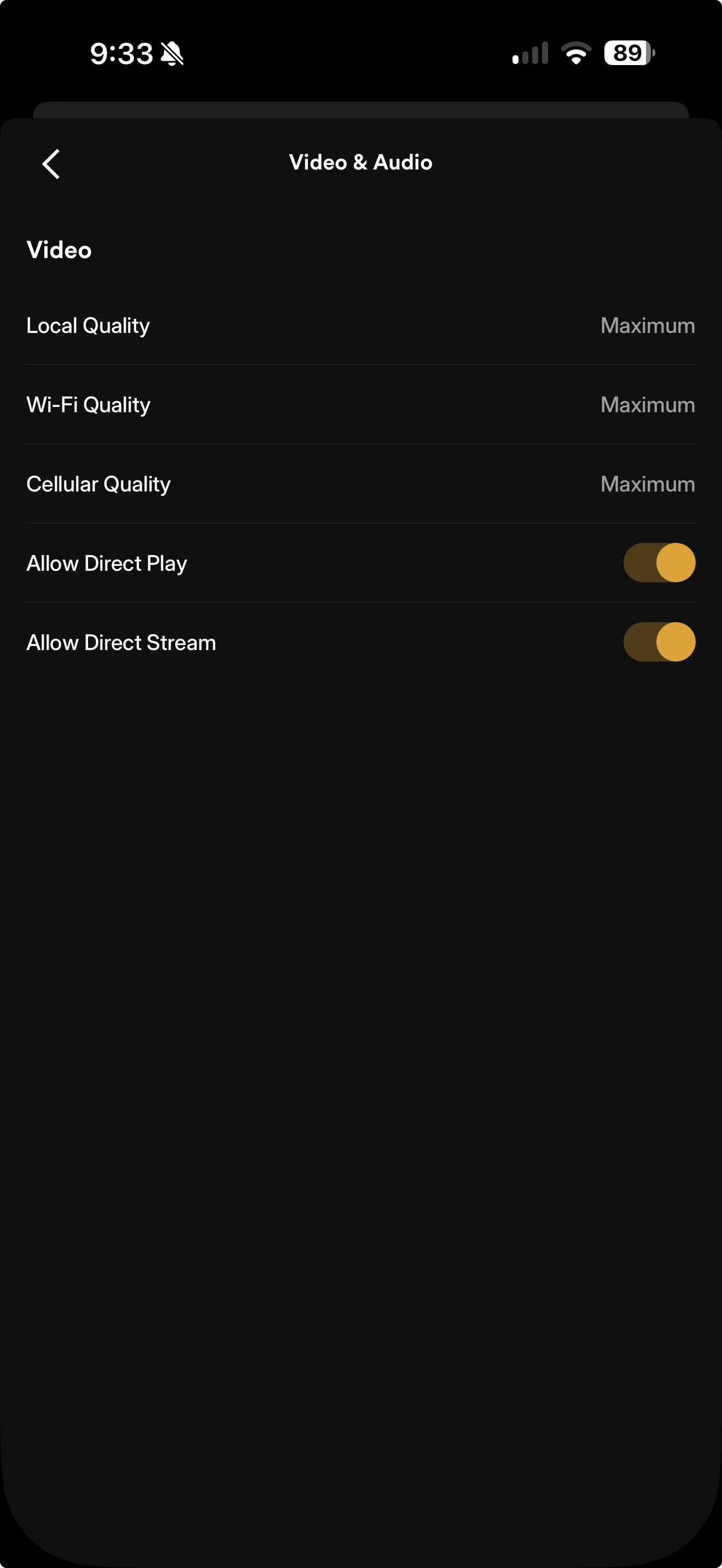
- Tap your avatar (top right) → Video & Audio
- Set Local Quality, Wi-Fi Quality, and Cellular Quality to
Maximum/Original - Make sure Allow Direct Play and Allow Direct Stream are both on
 Tap to enlarge
Each of the three quality settings covers a different network — set all three, including Cellular if you ever watch off Wi-Fi.
For the smoothest playback, try SenPlayer, Infuse, or VidHub connected to your Plex server — they support more formats and codecs natively than the Plex app, so they almost never transcode.
Android
- Tap your avatar (top right) → Video & Audio
- Set Local Quality, Wi-Fi Quality, and Cellular Quality to
Maximum/Original - Make sure Allow Direct Play and Allow Direct Stream are both on
Same three-network setup and the exact same screen as iPhone (pictured on the iOS card) — Local, Wi-Fi, and Cellular each have their own setting.
Fire TV / Fire Stick
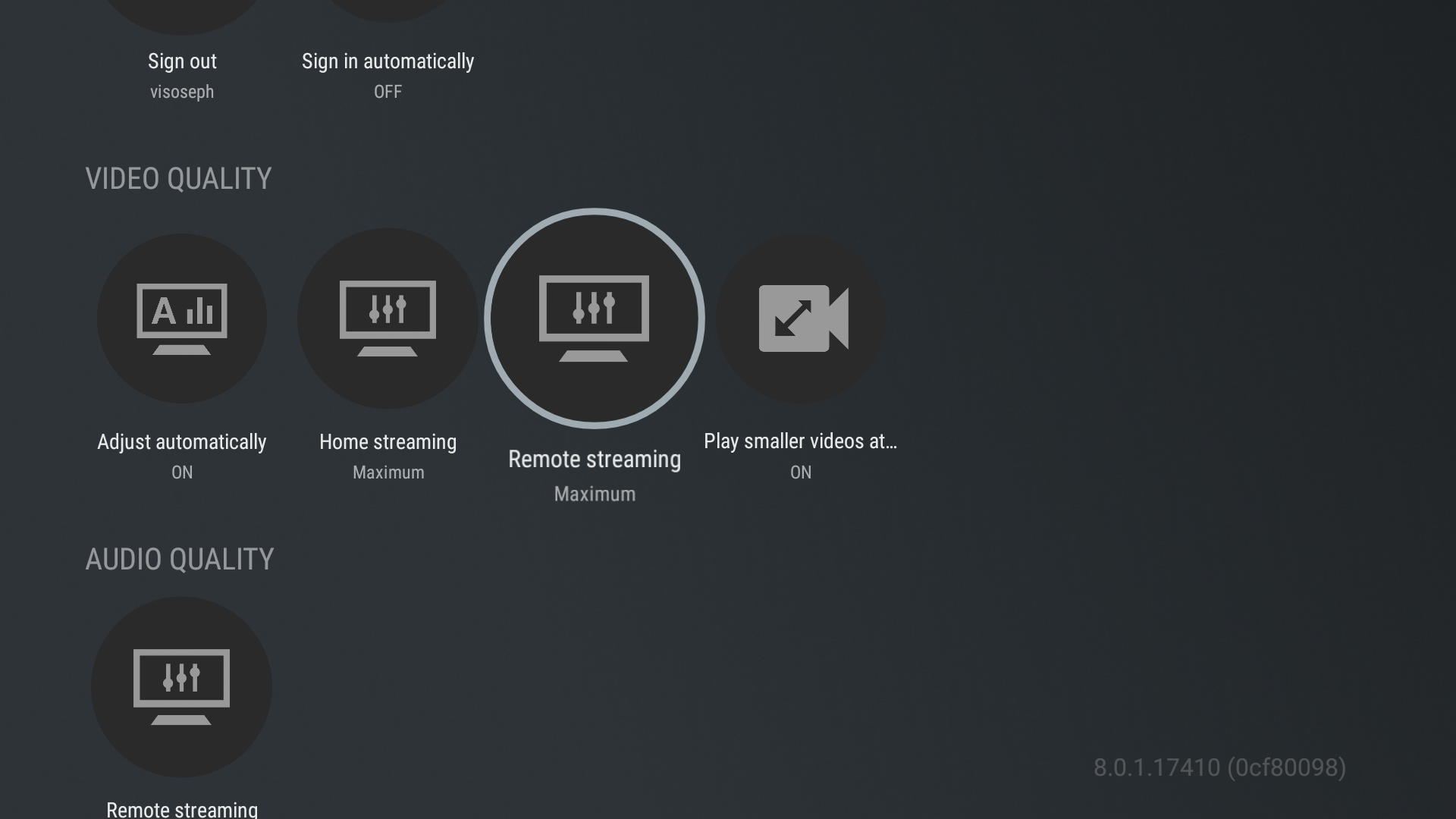
- Open Plex and go to Settings (gear, top of the home screen)
- Select Video Quality
- Set Home Streaming and Remote Streaming to
Maximum - Make sure Adjust Automatically is
Off
 Tap to enlarge
Older Fire Sticks (1st/2nd gen) have weak hardware — high-bitrate or HDR files may still transcode on those.
Android TV
- Open the Plex app, click your username (top left)
- Open Settings → scroll to Video Quality
- Set Home Streaming and Remote Streaming to
Maximum - Make sure Adjust Automatically is
Off
This covers Nvidia Shield, Sony/TCL/Hisense Android TVs, and similar boxes — the menu is a simple list, closer to Roku than to Fire TV's icon-grid layout.
Apple TV
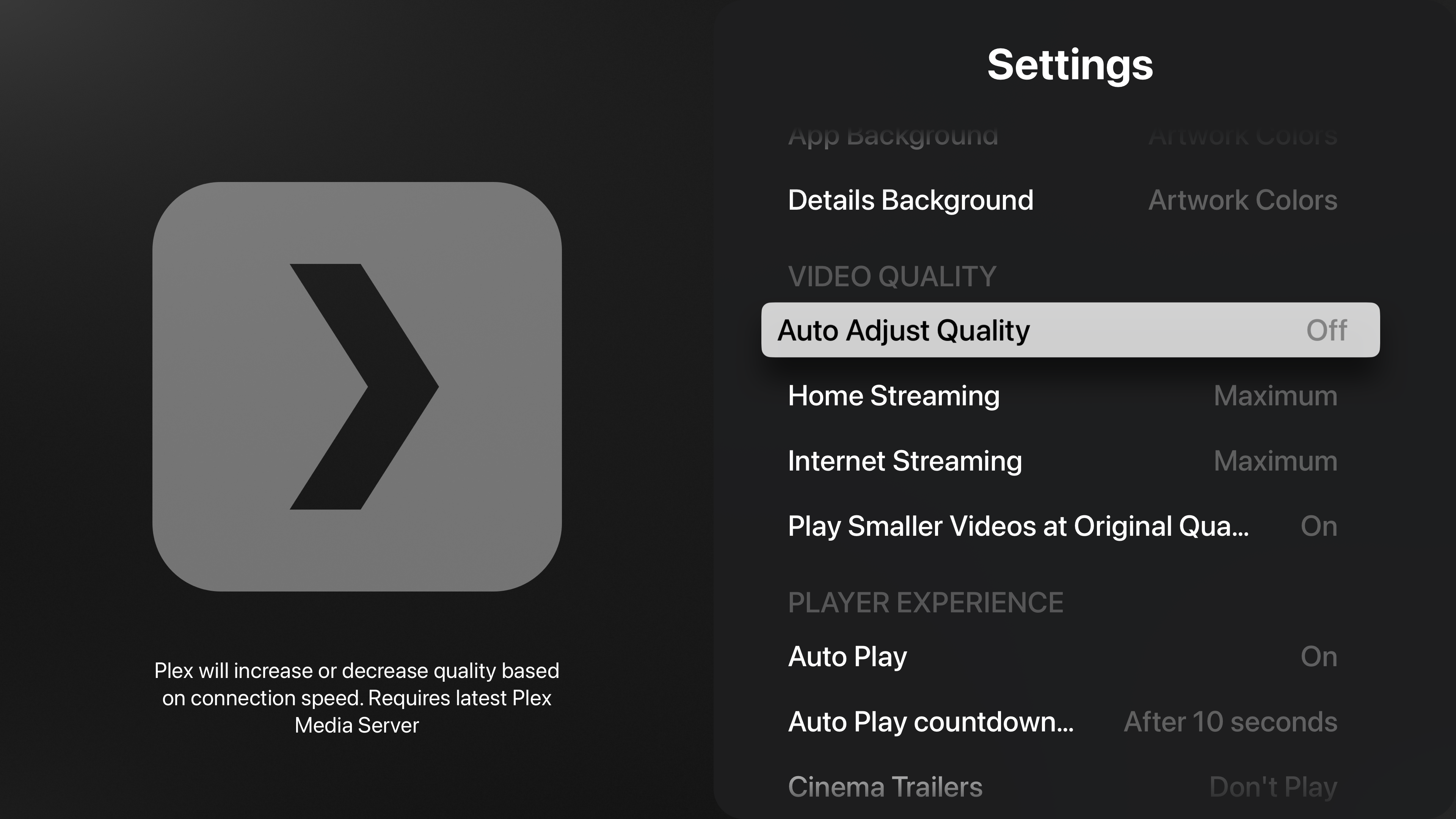
- Open Plex and go to Settings (top of the sidebar)
- Scroll to the Video Quality section
- Set Home Streaming and Internet Streaming to
Maximum - Make sure Auto Adjust Quality is
Off
 Tap to enlarge
Apple TV hardware plays almost every format natively — it rarely needs to transcode.
For the smoothest playback, try SenPlayer, Infuse, or VidHub connected to your Plex server — they support more formats and codecs natively than the Plex app, so they almost never transcode.
Google TV / Chromecast
- Open Plex and select the Settings gear
- Select Quality
- Set it to
Original
Casting from your phone instead? The phone app controls the stream — set quality there.
Samsung Smart TV
- Open the Plex app and select the Settings gear
- Select Quality
- Set Streaming Quality (or Video Quality) to
Original/Maximum
Tizen's Plex app menu varies by TV model, and some hide 'Original' behind a scroll or 'more options'.
Kodi
- Open the Plex addon settings (gear icon within the addon, not Kodi's main settings)
- Select Quality
- Set all quality options to
Original - Enable Allow Direct Play and Allow Direct Stream checkboxes
Settings are managed entirely inside the addon interface rather than Kodi's main system settings.
Xbox
- Open the Plex app and go to Settings (gear under your profile/avatar)
- Select Video
- Set the quality options to
Original - Make sure Allow Direct Play and Allow Direct Stream are both checked
Xbox consoles support most direct stream formats, but check audio settings if transcoding still occurs.
Web browser
- While something is playing, click the settings gear in the player bar
- Set Quality to
Original
Browsers can't play every format — HEVC files may still transcode here. Use a native app when you can.
Windows / Mac / Linux app
- Click the settings gear in the player
- Set Quality to
Original
The desktop app plays nearly everything natively — one of the most reliable ways to watch.
Some devices (Roku, Apple TV, Fire TV) also have their own Allow Direct Play / Allow Direct Stream switches under Quality settings. If a device keeps transcoding after the steps above, turn those on too.
Check that it worked
- Start playing something on your device.
- Ask whoever runs the server to check the Now Playing dashboard — or check it yourself at plex.tv/web (tower icon).
- Look at the badge under your stream:
Direct Stream is fine — only audio or subtitles are being repackaged, the video is untouched. Only Transcode means the video itself is being re-compressed.
Finding Your Media
- Accept the invite: Accept the Plex library-share invitation using the same Plex account you use in the app.
- Sign in: Sign in to Plex on your device.
- Locate the library: Open the left navigation/sidebar and select the shared server or library under Your Media (or Libraries).
- Still missing? If it does not appear, restart the app and check that the invite was accepted.
For detailed steps, see the official Plex support article on Accepting Server Share Invitations.
Official Plex documentation
- Direct Play, Direct Stream & Transcoding Overviewsupport.plex.tv
- Streaming Media: Direct Play and Direct Streamsupport.plex.tv
- How do I choose the right Streaming Quality in an app?support.plex.tv
- How do streaming quality selections work?support.plex.tv
- Creating and Managing Server Shares (Accepting Invitations)support.plex.tv